

By Georgiy Nurov, Founder of Playbox · Updated
Short answer
To find pickup football games near you, open a games app like Playbox and set your location, days and format once. Game Radar notifies you when a matching game opens nearby. Join on your own or bring friends, pay online, then just turn up and play. After competitive games you get your stats, rating change and best moments.
Wanting to play football and actually playing every week are two different things. The group chat goes quiet, the weekly five-a-side you used to join stops, and searching for pickup soccer near you turns up old forum posts and teams looking for a goalkeeper on the other side of town.
Playing more does not need a fixed team or a friend who organizes. Below is how players on Playbox find games that fit their schedule, join on their own or with friends, and watch their numbers grow from match to match. Every step links to a detailed Help Center article if you want to go deeper.
New to Playbox? See how the Playbox rating works or browse more guides on the Playbox blog.
How do you find pickup football games near you?
Find games that fit you
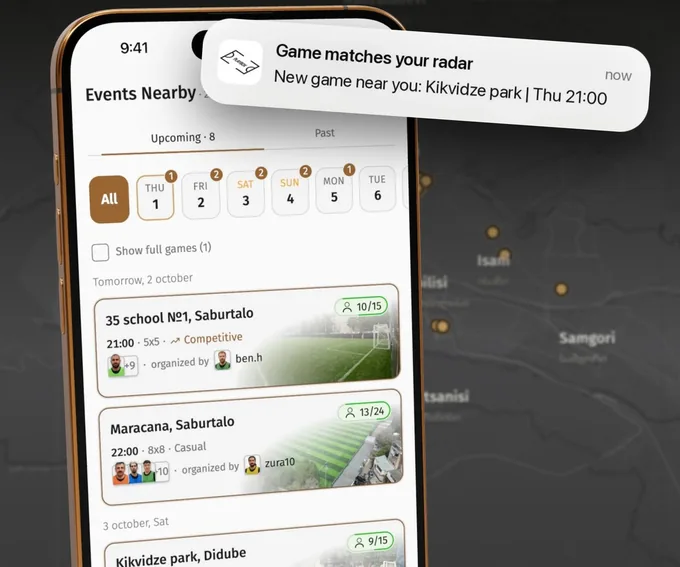
Set your preferences once. Playbox pings you when a match opens nearby.
Open the games feed to see the upcoming games around you: the pitch, the kick-off time, the format, whether the game is competitive and how many spots are left. Filter by city, date and format to narrow it down.
Then set up Game Radar once: your location and search radius, the days and times you can play, and the formats you like. When a new public game that matches is published nearby, Playbox notifies you, so you hear about it before the spots are gone.
Join your way
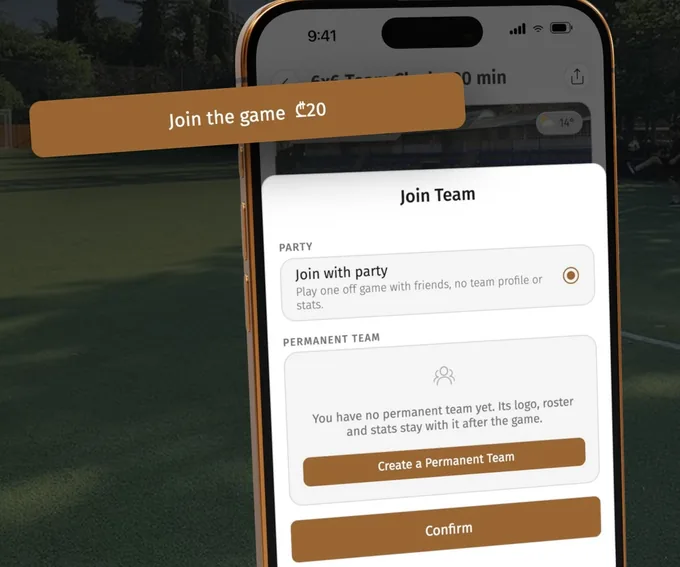
Solo, with friends or with your own team.
In a regular pickup game there is one button: Join the game. Tap it, choose how to pay and your spot is saved. Coming with friends? Add them to your group and pay for everyone at once, so you all get spots together.
Team Clash games are played team against team, and there you choose how to join: as a one-off party with friends, with your permanent team that keeps its logo, roster and stats, or on your own through the draft, where a captain or the organizer invites you.
If a game is already full, join the waitlist and Playbox lets you know when a spot opens.
Enjoy the game

Just play. With your team, your friends or new people: Playbox takes care of the rest.
On match day Playbox reminds you before kick-off, and the time and the exact place are in the game lobby. If you paid in the app, your spot is already settled, so there is no cash to collect on the pitch.
Teams are split in the app shortly before the game, so bring a light and a dark shirt. The ball and the bibs are on the organizer. All that is left for you is to play.
Get your results
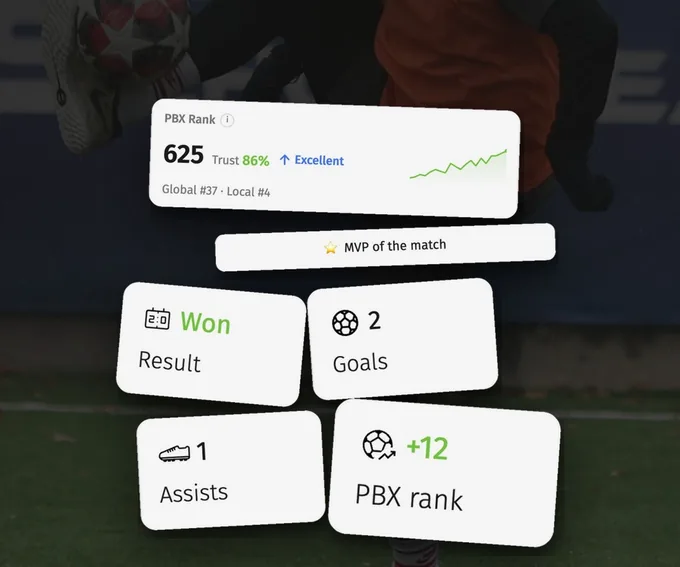
Play competitive games and get your stats, rating and best moments after every match.
Competitive games count. After the final whistle, the players confirm the result in the app, and once it is confirmed you get your match report: the result, your goals and assists, the MVP of the match and how your PBX rating moved.
Casual games are just for fun and leave your numbers as they are. Play competitive ones and your rating gets more accurate with every match, which also helps the app split players into balanced teams.
How do you get more out of every game?
You do not need any of these to play. They are what make a weekly game feel like it is going somewhere.
Know everything before the game
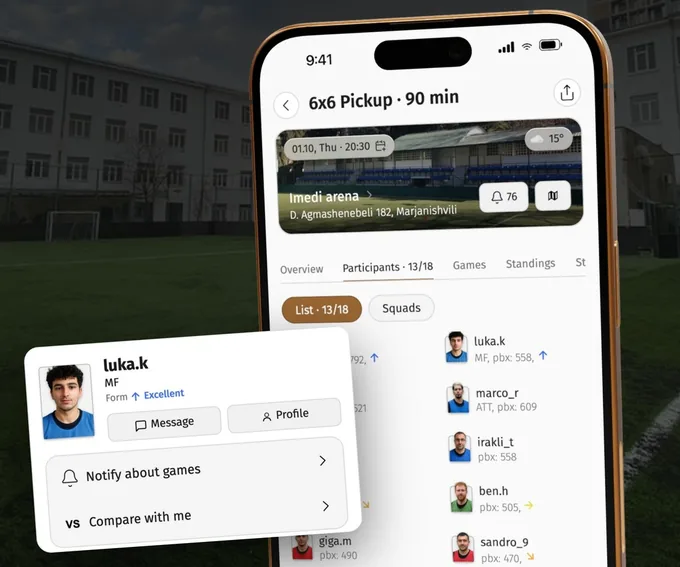
Weather, kick-off, who's playing, the organizer and more: it's all in the game lobby.
Every game has a lobby with what you need before you leave home: the pitch and its address, the kick-off time, the weather forecast, the format, the rules and the organizer.
See who is playing. Tap any player to open their mini-profile with their current form, and compare your stats with theirs before you meet on the pitch.
Your games add up to a career
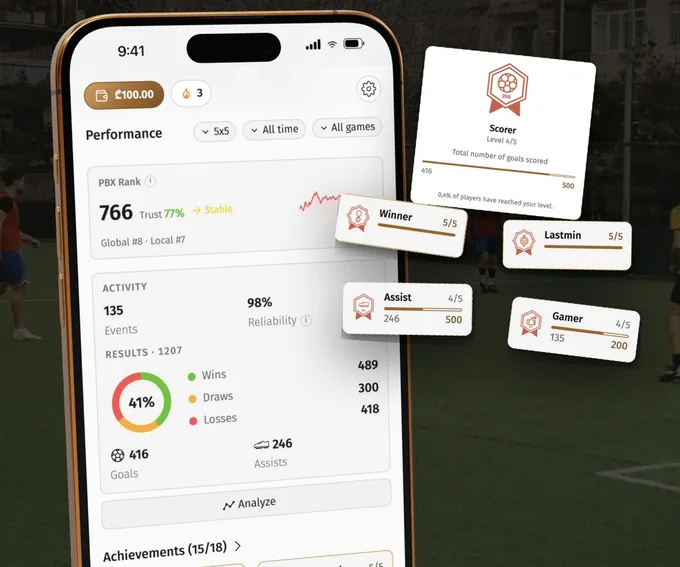
Your profile grows with every game, unlocking achievements along the way.
Every confirmed game lands in your profile. The Performance section shows your PBX rank, games played, wins, draws and losses, goals, assists and reliability, filtered by format and period.
Achievements unlock as you play competitive games: Scorer, Assist, Winner, MVP, Hat-trick and more, each with five levels. Your weekly streak shows how many weeks in a row you have played.
Climb the leaderboard
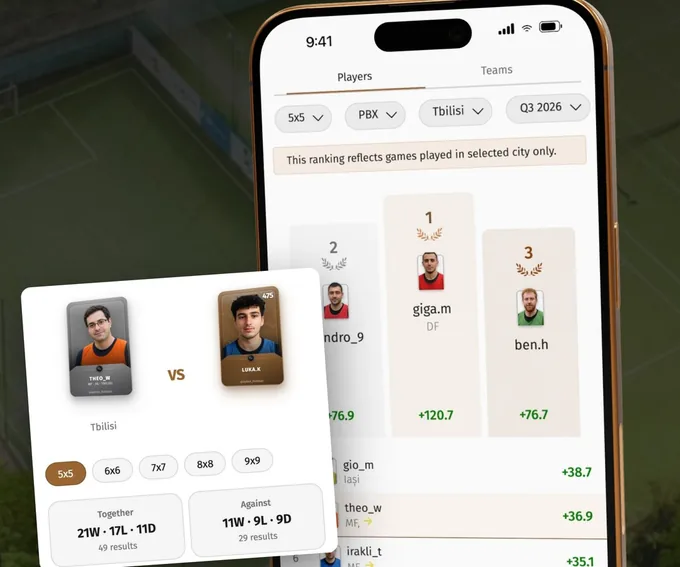
Check your local or global rank, set the board your way and compare with anyone.
Leaderboards rank players by PBX rating, wins, goals, assists, win rate and more. Filter by format, city and season to see where you stand locally, or open the global board.
Seasons follow the calendar quarter, so you can see who climbed the most this season, not only of all time. With Versus, compare yourself with any player: your record together on the same team and against each other.
Your moments, on video
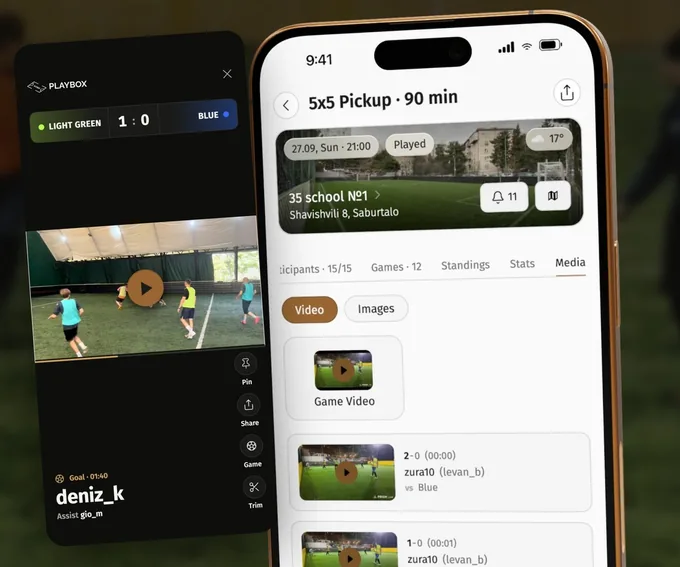
Every goal from a streamed game gets its own clip.
When a game is streamed, the full recording appears in the Media tab of the game lobby after the final whistle, and every goal gets its own clip with the time, the scorer and the assist.
Switch to Only mine to keep just your goals and assists, then share your best moment.
Play often? Play for less
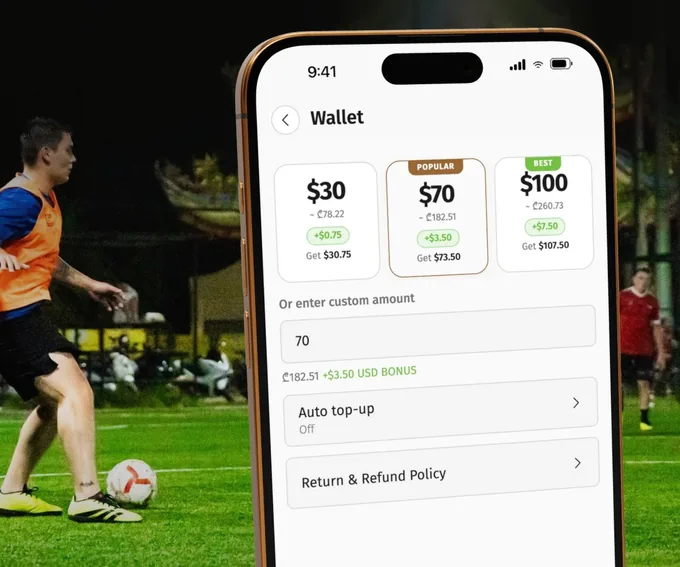
Top up your wallet for the long run. Up to 12.5% cheaper, covered by Playbox.
Top up your Playbox wallet by card, Apple Pay or Google Pay and you get a bonus on top: +2.5% from $30, +5% from $70 and +7.5% from $100, or the same amounts in your local currency.
Every game you then pay from the wallet is another 5% cheaper. Together that is up to 12.5% off what you pay to play, and Playbox covers the discount, so the organizer still gets the full price.
Start your own game
No game at the time you want, or friends who keep saying you should all play? Create one. Pick a pitch and a time, share the link, and Playbox helps you fill the empty spots.
The Organizer Playbook walks you through it in five steps.

Questions players ask
How do I find people to play football with?+
Join pickup games. On Playbox you sign up for a game on your own and play with whoever else joined, so you do not need a team or a group of friends. Set up Game Radar and Playbox tells you when a game near you opens.
Is there an app to find football games near me?+
Yes. Playbox lists pickup football (soccer) games near you with the pitch, time, format and spots left, lets you join and pay in the app, and tracks your stats and rating after competitive games. It works in the browser, on iPhone and on Android.
Where can adults play football?+
Adults play in pickup games at local five-a-side and seven-a-side pitches, in amateur leagues and in regular weekly games run by organizers. The games feed on Playbox shows the ones near you with their format and level, so you can pick one that fits.
How do I start playing football as an adult?+
Start with a casual pickup game in a small format like 5v5, where everyone gets on the ball. Check the game lobby for the format and the pitch, bring boots for the surface and shin pads, and try to play every week. Once you play competitive games, your rating helps match you with players at your level.
How can I track my football stats?+
Play competitive games on Playbox. Once the result is confirmed, your goals, assists, wins and PBX rating are added to your profile automatically, and you can compare them with any other player.
How do I join a football team as an adult?+
Play pickup games first: you meet regular players and the organizers who run teams. On Playbox, Team Clash games are played team against team. Join one on your own through the draft, where a captain or the organizer invites you, or create a permanent team with your friends.